What Is an eSIM? How Embedded SIMs Work (2026 Guide)
An eSIM is a digital SIM built into your phone. Learn what it does, how it works, how it differs from virtual SIMs, and which devices support it.

Quick answer: An eSIM (embedded SIM) is a digital SIM built into your phone. Instead of inserting a physical card, you download a mobile plan straight onto a small chip that is already inside the device. It connects you to a mobile network for data, calls and texts, just like a regular SIM card.
If your new phone has no SIM tray, or you have seen "eSIM" on a travel plan, this guide explains what it is, what it does and how it works, in plain English. It also clears up the confusing terms people use for it, such as virtual SIM, digital SIM and electronic SIM.
What is an eSIM?
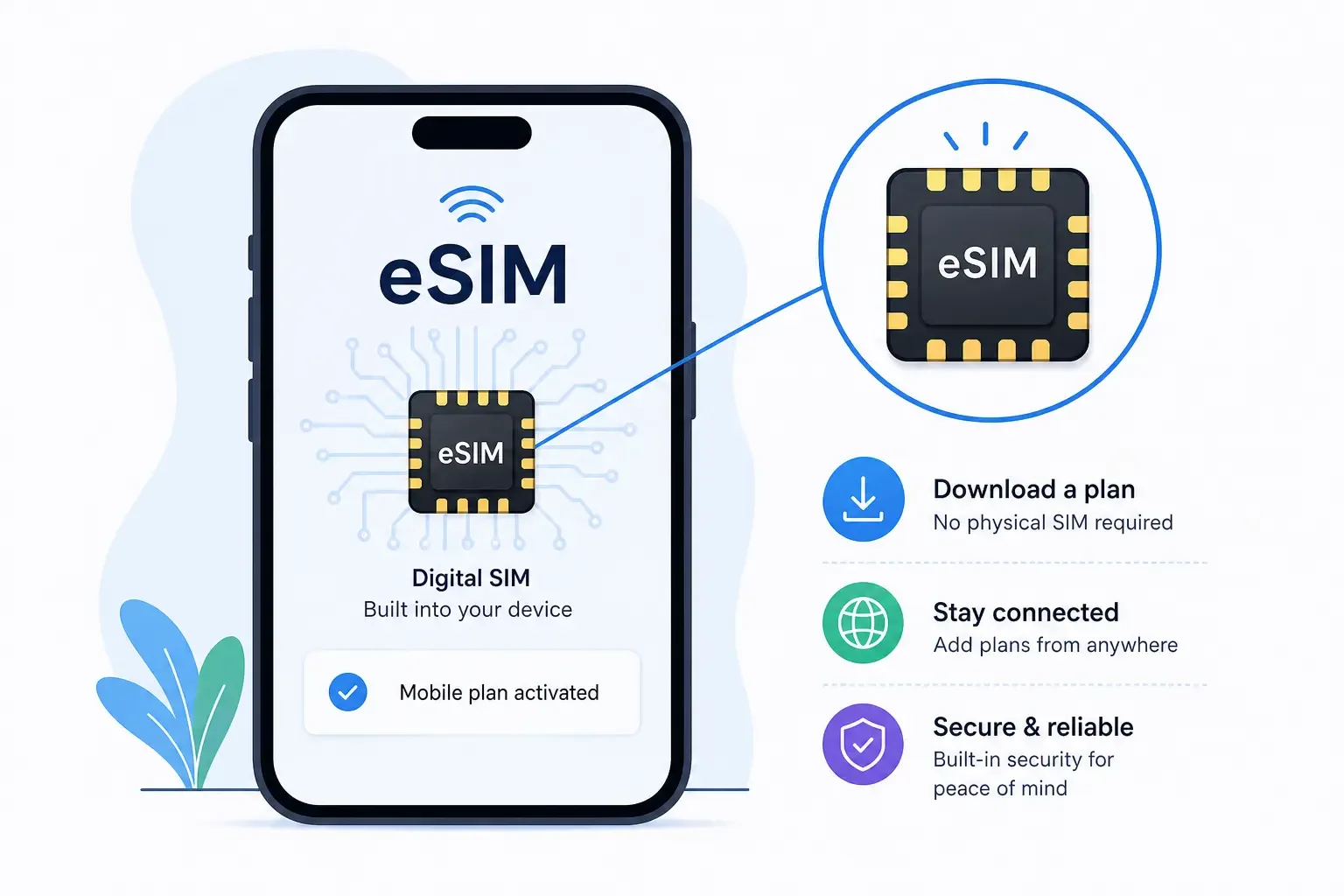
An eSIM is a SIM that lives inside your phone rather than in a removable tray. It does the same job as the plastic SIM card you already know. The difference is how your mobile plan gets onto it: you download it instead of inserting it.
What does "eSIM" stand for?
eSIM stands for embedded SIM, and SIM stands for Subscriber Identity Module. The word "embedded" is the key part: the SIM is built into the device's hardware.
You will sometimes see it called an electronic SIM. That is a common misreading of the "e", but it points at the same thing, so if you searched for "electronic SIM card", you are in the right place.
Is an eSIM a card?
No, there is no card to hold. An eSIM is a tiny chip soldered onto your phone's main circuit board. You never see it or touch it.
What you actually "get" when you buy an eSIM plan is a small file called an eSIM profile. The profile is downloaded to the chip and tells your phone which network to join and how to prove you are a paying customer.
What does an eSIM do?
An eSIM connects your phone to a mobile network. Without a SIM of some kind, a phone can use Wi-Fi but cannot make ordinary calls, send texts or use mobile data.
What an eSIM stores
A SIM, whether physical or embedded, stores your subscriber identity and the security keys your network uses to recognize you. The best-known piece is the IMSI (International Mobile Subscriber Identity), a unique number tied to your plan.
Think of it as a digital ID badge. When your phone connects to a mobile tower, the SIM shows the badge, the network checks it, and you are let in.
What an eSIM can do that a physical SIM can't
Because the plan is software rather than plastic, an eSIM can do a few things a physical SIM cannot:
Hold several plans at once. One eSIM chip can store multiple profiles, such as your home plan, a work line and a travel data plan.
Switch lines in Settings. You change plans with a tap instead of swapping cards.
Be set up before you travel. You can buy and install a plan for your destination at home, then switch it on when you land.
Run two lines together. Most modern phones let you use an eSIM alongside another eSIM or a physical SIM, often called dual SIM.
How does an eSIM work?
Most guides skip this part, but the basics are simple. There are three pieces: a chip, a profile and a secure way to deliver the profile to the chip.
The chip: eUICC
The chip inside your phone is called an eUICC (embedded Universal Integrated Circuit Card). A traditional SIM card is a UICC; the eUICC is its built-in version.
What makes the eUICC special is that it is rewritable. It can store several operator profiles and accept new ones over the internet, which a traditional SIM cannot do.
The profile: what you actually download
An eSIM profile holds everything one mobile plan needs: the network details, your subscriber identity and the security keys. Buying an eSIM plan really means getting one of these profiles.
Your phone can keep several profiles saved. You choose which ones are switched on in your settings, and the rest wait until you need them.
The download, in four steps
Here is what happens between buying a plan and getting a signal:
You buy a plan. You pick a plan from a mobile carrier or an eSIM provider, in an app or on a website.
The provider prepares your profile. It is stored on a secure server known as an SM-DP+ (Subscription Manager Data Preparation). Think of this as the provider's locked vault of profiles.
Your phone fetches the profile. Software built into your phone, called the LPA (Local Profile Assistant), connects to that server, usually after you scan a QR code or tap a button in an app.
The profile installs and connects. The profile is saved onto the eUICC chip, and your phone joins the network.
The whole exchange happens over an encrypted connection, which is why an internet connection (usually Wi-Fi) is needed when you first install an eSIM.
The standard behind it: GSMA
eSIMs work across different phone makers and networks because they follow a shared standard from the GSMA, the global association of mobile operators. The GSMA's consumer eSIM specification, known as SGP.22, defines how phones, chips and provisioning servers talk to each other. This process is called Remote SIM Provisioning (RSP).
That shared standard is why an eSIM from one provider can be installed on an iPhone, a Samsung or a Google Pixel in the same way.
Three ways to install an eSIM
QR code. Scan a code from your provider with your phone's camera or from the settings menu.
Manual entry. Type in the SM-DP+ address and activation code your provider gives you. Useful if you only have one phone and can't scan the code.
In-app install. Many providers let you install the eSIM directly from their app with a tap.
On an iPhone, eSIM options live under Settings → Cellular (called Mobile Service or Mobile Data in some regions). On Android, look under Settings → Network & internet → SIMs, though the exact wording varies by manufacturer.
eSIM vs physical SIM card
Both do the same job and connect to the same networks. The difference is that an eSIM is downloaded rather than inserted, can hold several plans at once, and can't be moved to another phone by hand the way a card can. Physical SIMs are simpler to swap between phones; eSIMs are simpler to set up and change.
eSIM vs virtual SIM vs digital SIM vs iSIM: are they the same?
These terms get mixed up constantly. Here is how they actually relate.
"Virtual SIM" and "digital SIM" usually mean eSIM
In everyday use, and in most travel eSIM marketing, virtual SIM and digital SIM are simply other names for an eSIM. If a provider sells you a "virtual SIM card" that you install with a QR code, it is almost certainly an eSIM.
When "virtual SIM" means something else
The term is not always used that way. It can also refer to:
Virtual number apps, which give you an extra phone number that works over the internet but still rely on your existing SIM or Wi-Fi for connectivity.
SoftSIM or cloud SIM technology, where the SIM runs purely in software with no dedicated secure chip. It is used in some devices and portable hotspots, but it is not the same as a standard eSIM.
So if a product says "virtual SIM", check whether it asks you to scan a QR code into your phone's cellular settings. If it does, it is an eSIM.
What is an iSIM?
An iSIM (integrated SIM) goes one step further than eSIM. Instead of sitting on its own chip, the SIM is built into a secure area inside the phone's main processor, known as the system-on-chip. It works the same way as an eSIM from the user's point of view, but it takes up even less space. iSIMs are mostly used in small connected devices today and are not yet common in phones.
| Physical SIM | eSIM | iSIM | SoftSIM | |
|---|---|---|---|---|
| Hardware | Removable plastic card | Dedicated chip soldered to the board | Built into the main processor | None; software only |
| Removable | Yes | No | No | No |
| Plans stored | One per card | Several | Several | Varies |
| Security | Secure chip | Secure chip | Secure area of the processor | Weaker; no dedicated secure hardware |
| Where you find it | Most phones | Modern phones, watches, tablets | Some connected devices | Some hotspots and low-cost devices |
Benefits of an eSIM
For everyday users
Instant activation. No waiting for a card in the post or a trip to a store.
Nothing to lose or break. There is no tiny card to drop, bend or misplace.
Better phone design. Removing the SIM tray frees internal space and removes one opening in the phone's frame.
For travelers
This is where eSIMs shine. You can buy a data plan for your destination before you leave, install it at home, and switch it on when you land. There is no hunting for a SIM kiosk at the airport, no passport paperwork at a phone shop, and no surprise roaming bill.
Because most phones support two active lines, you can also keep your home number switched on for calls and texts while the travel eSIM handles your data.
For security
If your phone is stolen, a thief cannot pop out an eSIM and put it in another phone to receive your calls or texts. That is a real improvement over a physical SIM.
It is not a complete shield, though. SIM-swap fraud, where a scammer convinces your carrier to move your number to their device, targets your carrier account rather than the SIM itself, so it can affect eSIM and physical SIM users alike. Setting a PIN or passcode on your carrier account is the best protection.
Drawbacks and limitations
eSIMs are not perfect, and it is worth knowing the trade-offs before you rely on one:
Your phone must support it. Older and some budget phones do not have an eSIM chip.
Your phone must be unlocked to use an eSIM from a different carrier or a travel eSIM provider.
Moving to a new phone takes a few steps. Most modern phones offer an eSIM transfer option, but it is not as simple as moving a card.
Many travel eSIMs are data-only. They often do not include a local phone number or SMS.
No quick swap if your phone dies. With a physical SIM, you can put the card into a spare phone. With an eSIM, you need the new phone to download the profile again.
Setup needs an internet connection. Installing a new eSIM usually requires Wi-Fi or another data connection.
Regional gaps. Some phone models sold in certain markets, such as mainland China, come without eSIM support.
Which devices support eSIM?
Phones
iPhone: iPhone XS, XS Max and XR (2018) and every model since support eSIM. iPhone 14 and later models sold in the US are eSIM-only, with no SIM tray at all.
Google Pixel: Pixel 3 and later support eSIM (the Pixel 2 supported it only on Google Fi). Some regional variants differ.
Samsung Galaxy: Galaxy S20 and later flagship models, plus recent Z Fold and Z Flip models, support eSIM, though support depends on the region and model number.
Other brands: Many recent phones from Motorola, OnePlus, Xiaomi and others support eSIM, but support varies widely by model and market.
Tablets, watches and laptops
Cellular iPads, cellular smartwatches such as the Apple Watch and Samsung Galaxy Watch, and a growing number of Windows laptops also use eSIMs. On watches, the eSIM usually shares your phone's number through your carrier.
How to check if your phone supports eSIM
Dial
*#06#. If your phone shows an EID (a long eSIM identification number), it has an eSIM chip.Check your settings. On iPhone, look for "Add eSIM" under Settings → Cellular. On Android, look for an "Add eSIM" or "Download a SIM" option under your SIM settings.
Check that your phone is unlocked. Having an eSIM chip is not enough if your phone is locked to one carrier.
A short history of eSIM
2016: The GSMA published its first consumer eSIM specifications, and the Samsung Gear S2 Classic 3G smartwatch became one of the first consumer devices with an eSIM.
2017: The Google Pixel 2 (on Google Fi) and the cellular Apple Watch Series 3 brought eSIMs to the mainstream.
2018: The iPhone XS, XS Max and XR added eSIM alongside a physical SIM slot.
2022: Apple removed the SIM tray from US models of the iPhone 14, making them eSIM-only.
Since then, eSIM has moved from a niche feature to a standard one on most new flagship phones.
Do you need an eSIM?
You will get the most out of an eSIM if you:
Travel abroad, even once or twice a year, and want data without roaming charges.
Want two numbers on one phone, such as personal and work.
Have a phone with no SIM tray, in which case an eSIM is the only option.
Want a backup data plan for times when your main network is weak.
If your phone supports eSIM and you are heading abroad, a travel eSIM is the easiest way to stay connected from the moment you land. Browse eSIM70 plans for 150+ destinations.
Frequently asked questions
What is an eSIM in simple terms?
An eSIM is a SIM card built into your phone. Instead of inserting a plastic card, you download a mobile plan onto a small chip that is already inside the device. It connects you to a mobile network for data, calls and texts, just like a regular SIM.
Is an eSIM the same as a virtual SIM?
Usually, yes. Most travel providers use "virtual SIM" and "digital SIM" as other names for an eSIM. The term can also mean virtual-number apps or softSIM technology, which work differently. If you install it by scanning a QR code into your phone's cellular settings, it is an eSIM.
Is an eSIM a physical card?
No. An eSIM is a tiny chip soldered onto your phone's circuit board, so there is no card to insert or remove. What you buy is a digital eSIM profile that downloads onto that chip.
Does an eSIM give me a phone number?
It depends on the plan. An eSIM from your mobile carrier normally includes your phone number. Many travel eSIMs are data-only, so they give you mobile data but no local number or SMS.
Can I have two eSIMs on one phone?
Yes. Most modern phones can store several eSIM profiles and use two lines at the same time, either two eSIMs or one eSIM plus a physical SIM. The exact limits vary by phone model.
Is an eSIM safer than a physical SIM?
In one important way, yes: a thief cannot remove an eSIM and put it in another phone. However, SIM-swap fraud targets your carrier account, not the SIM, so it can affect both types. Set a PIN or passcode on your carrier account for the best protection.
Does an eSIM work internationally?
Yes. That is one of its biggest uses. You can buy a travel eSIM for your destination before you leave, install it at home and switch it on when you land, avoiding roaming charges on your home plan.
Can I move my eSIM to a new phone?
Usually, yes. Most recent iPhones and Android phones offer an eSIM transfer option during setup, and your carrier or eSIM provider can reissue a profile if needed. It takes a few more steps than moving a physical card.
Does an eSIM use more battery?
No. An eSIM does the same job as a physical SIM and does not noticeably change battery use. Battery life depends on your phone, signal strength and how you use it.
What happens to my eSIM if I lose my phone?
The eSIM stays in the lost phone, and a thief cannot remove it. Contact your carrier or eSIM provider to suspend the line, then install a new eSIM profile on your replacement phone.
Can I convert my physical SIM to an eSIM?
Often, yes. Many carriers let you convert through their app, website or a store, and some iPhones offer a "Convert to eSIM" option in settings where the carrier supports it. Check with your carrier first.
Contributors
Jaseel S is the CEO and founder of Lascade. He leads a team of over 40 engineers, designers, and creatives dedicated to building consumer mobile applications that turn screen time into meaningful experiences.